

Overview
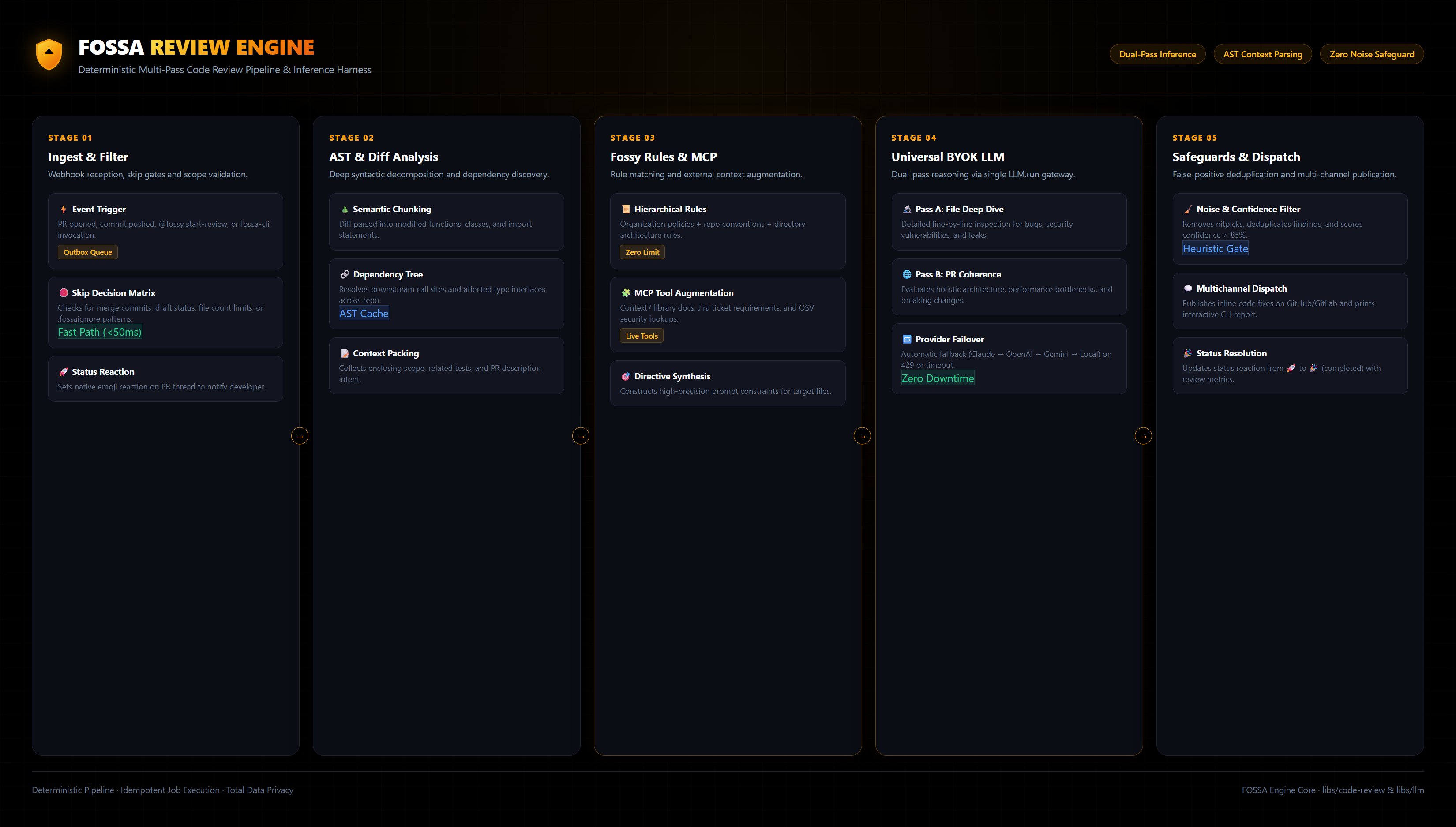
Fossy reviews your PRs automatically or on demand, adds clear suggestions, and helps your team decide when to merge. Below is the full execution lifecycle and architecture of how reviews are processed end-to-end.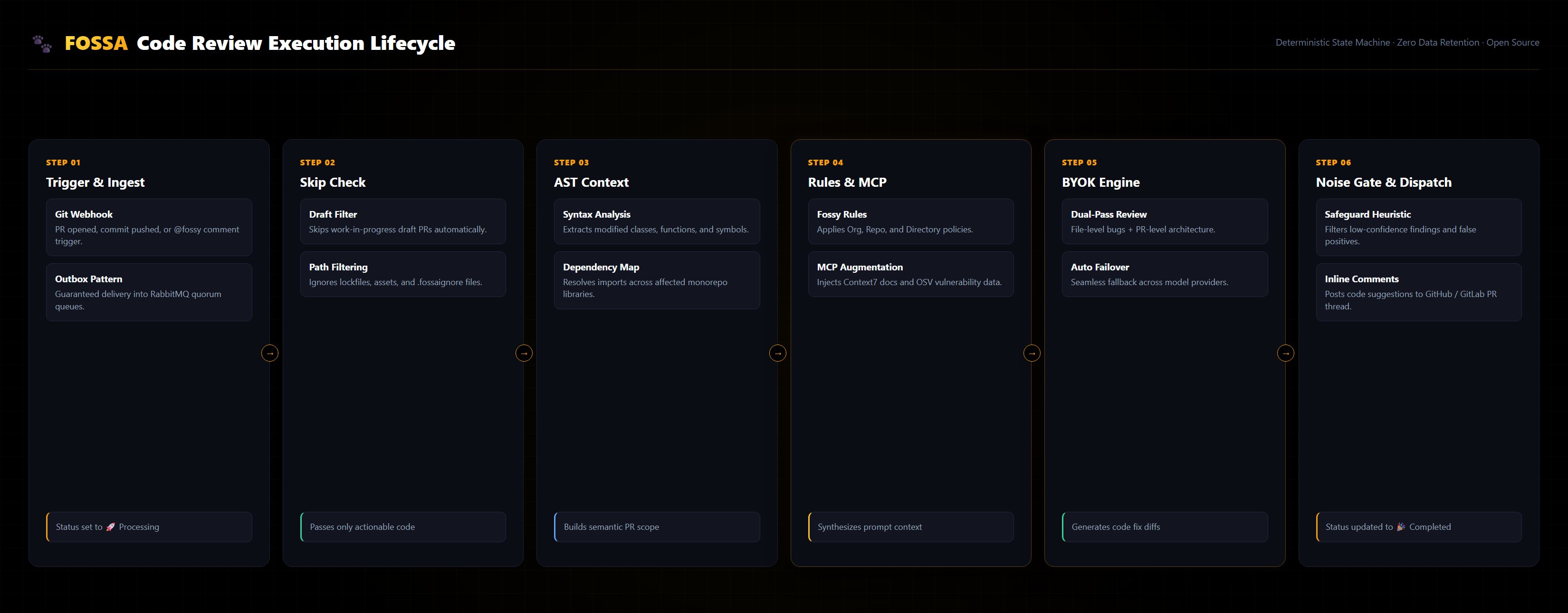
When Fossy Runs
- PR opened
- New commit pushed to the PR (depending on cadence)
- Manual trigger via comment:
@fossy start-review
When Fossy Skips
- No new commits since the last run
- Only merge commits with no effective changes
- All changed files ignored by configured patterns
- PR exceeds the configured file limit
- Invalid or missing configuration
To override a skip and force a fresh pass — for example after “no new commits” — comment
@fossy review --force.What Fossy Does
- Resolves which settings apply (global → repo → directory) and validates them
- Collects the relevant diffs and context for this PR
- Runs PR-level checks (e.g., custom rules and cross-file analysis when enabled)
- Reviews changed files with focus on the diff
- Filters and prioritizes suggestions to reduce noise (relevance, severity, dedupe, safeguards)
- Posts inline comments and, when applicable, a PR-level summary
- Optionally approves or requests changes if those policies are enabled
- Remembers the last analyzed commit to keep follow-ups incremental
What You Get
- Inline comments with concrete suggestions
- Optional PR-level summary with highlights
- Optional status: approved or changes requested (if enabled)
Status Reactions
Fossy uses emoji reactions to show the live status of your code review directly in your Git provider. No guessing whether she’s working, done, or ran into a problem. She always replaces the previous emoji with the latest status (for example: 🚀 → 🎉, 👀, 👎 or 😕).Native reactions work on GitHub, GitLab, and Forgejo.Azure DevOps and Bitbucket have no reaction API, so Fossy falls back to posting the status
emoji as a comment instead — you’ll see 👀 (skipped) and 😕 (error)
there, but not the 🚀 / 🎉 progress pair.
What each emoji means
- 🚀 Processing — Fossy is working on your code:
- Analyzing files
- Checking rules and policies
- Generating suggestions
- 🎉 Completed — Review finished:
- All comments posted
- Analysis complete
- You can review the suggestions
- 👀 Skipped — Review was skipped. Common reasons include:
- No new commits since the last run
- Only merge commits detected
- PR/MR exceeds the configured file limit
- No relevant files to review (ignored patterns)
- Branch not configured for review
- PR/MR in draft mode (if configured to skip drafts)
- 😕 Error — Something went wrong:
- Temporary technical issue during the review
- Try again; join our Discord community if it persists
Where reactions appear
- Automatic review (PR opened or new commit): reaction on the PR/MR description (top of the thread)
- Manual review (comment
@fossy start-review): reaction on your comment where you invoked Fossy
Example scenarios
- New PR (automatic): 🚀 while running → 🎉 when finished
- Manual command: 🚀 on your comment → 🎉 when finished
- No changes since last run: 👀 reaction
- Temporary issue: 😕 reaction
FAQs
I don’t see reactions- GitHub / GitLab / Forgejo: ✅ native reactions
- Azure DevOps / Bitbucket: ❌ no reaction API — look for the status emoji posted as a comment instead
- Normal—Fossy replaces previous status (🚀 → 🎉/👀/😕)
- Likely skipped: no new commits, merge-only, ignored files, or file limit
- Fix: comment
@fossy review --force— a plainstart-reviewwill skip again if there are no new commits
- Retry with
@fossy start-review. If persists, check Troubleshooting or Discord
Settings That Matter
- Automated vs manual reviews and follow-up cadence
- Ignore patterns and base branches in scope
- Custom rules and cross-file analysis
- Review filters: minimum severity and whether they apply to Fossy Rules
- File limits and timeouts
General Config
Configure modes, cadence, branches, and suggestion options
Review Policy
Understand suggestions vs blocking and when to enable each
Troubleshooting
Fix common issues and learn about limits
Tips
- Keep PRs small—large diffs reduce review quality
- Link specs/tickets in PR description
- Re-run with
@fossy start-reviewafter addressing feedback